
The latest THERIA_G version is now also available for PC Windows users. It has been compiled using the Intel(R) 64, Version 2021.5.0 compiler on a Windows 10 Pro for Workstation (64-bit) PC, and can be downloaded here.
New THERIA_G version!
The influence of pressure on the energy barrier of multi-component diffusion in garnet when using the Chakraborty and Ganguly (1992) dataset has been slightly underestimated in previous versions of THERIA_G. The updated version (available for MacOS here; PC version will be added soon) rectifies this. Thanks to Hugo Dominguez (PhD student @unibern with @PierreLanari) for pointing this out!
#opensource #Theria_G
Published: "Testing the equilibrium model: An example from the Caledonian Kalak Nappe Complex (Finnmark, Arctic Norway)"
Just in time for Christmas Eve, our latest paper is now typeset and available online here. The accepted preprint can be found here.
Merry Christmas!
Gaidies F, Heldwein OKA, Yogi MTAG, Cutts JA, Smit MA, Rice AHN (2022) Testing the equilibrium model: An example from the Caledonian Kalak Nappe Complex (Finnmark, Arctic Norway). Journal of Metamorphic Geology doi:https://doi.org/10.1111/jmg.12648
New paper alert!
Congratulations to former student Brigid Christison for the publication of her BScH research in Journal of Mammalogy! This research has been co-supervised by Dr. Dani Fraser from the Canadian Museum of Nature.
Christison BE, Gaidies F, Pineda-Munoz S, Evans AR, Gilbert MA, Fraser D (2021) Dietary niches of creodonts and carnivorans of the late Eocene Cypress Hills Formation. Journal of Mammalogy doi:10.1093/jmammal/gyab123
Charlie Roots Award for Lauren Maclellan
Congratulations to team member Lauren Maclellan! Lauren received the Charlie Roots Award in support of her BScH research. This award will help Lauren to study the compositional and microstructural properties of various sector-zoned crystals, using a combination of state-of-the-art analytical techniques, including XR-µCT, EPMA, and LA-ICP-MS.
Looking forward to some exciting research!
Advanced Metamorphic Petrology course online in winter 2022
I will offer my Advanced Metamorphic Petrology course again online this coming winter. If you are a grad student in Ontario and interested in quantitative petrology, please get in touch!
Testing the equilibrium model: An example from the Caledonian Kalak Nappe Complex (Finnmark, Arctic Norway)
Excited to share our latest preprint. With former MSc student Olivier Heldwein, @thrzyg, @JamieCutts_geo and colleagues @UBCeoas and at University of Vienna

Online or in-person?
Preparing the labs for the upcoming term. Hopefully, students will be able to study thin sections of real-life rocks again, using real-life microscopes..


Welcome Li Zhen!
We are happy to welcome PhD student Mr. Li Zhen in our team! Zhen received an award from the China Scholarship Council to pursue research in our lab for a period of two years, starting in 2022.
Looking forward to some exciting research on rocks from Eastern Tibet, and fruitful collaborations with colleagues at the University of the Chinese Academy of Sciences!
ThinSectionThursday
Some crystal “flowers” for #ThinSectionThursday. What mineral(s) could this be?


Yes, these are PPL images of garnet. The crystals shown are texturally sector-zoned (from the incredible collection of Hugh Rice).
LGBTQ Pride Month
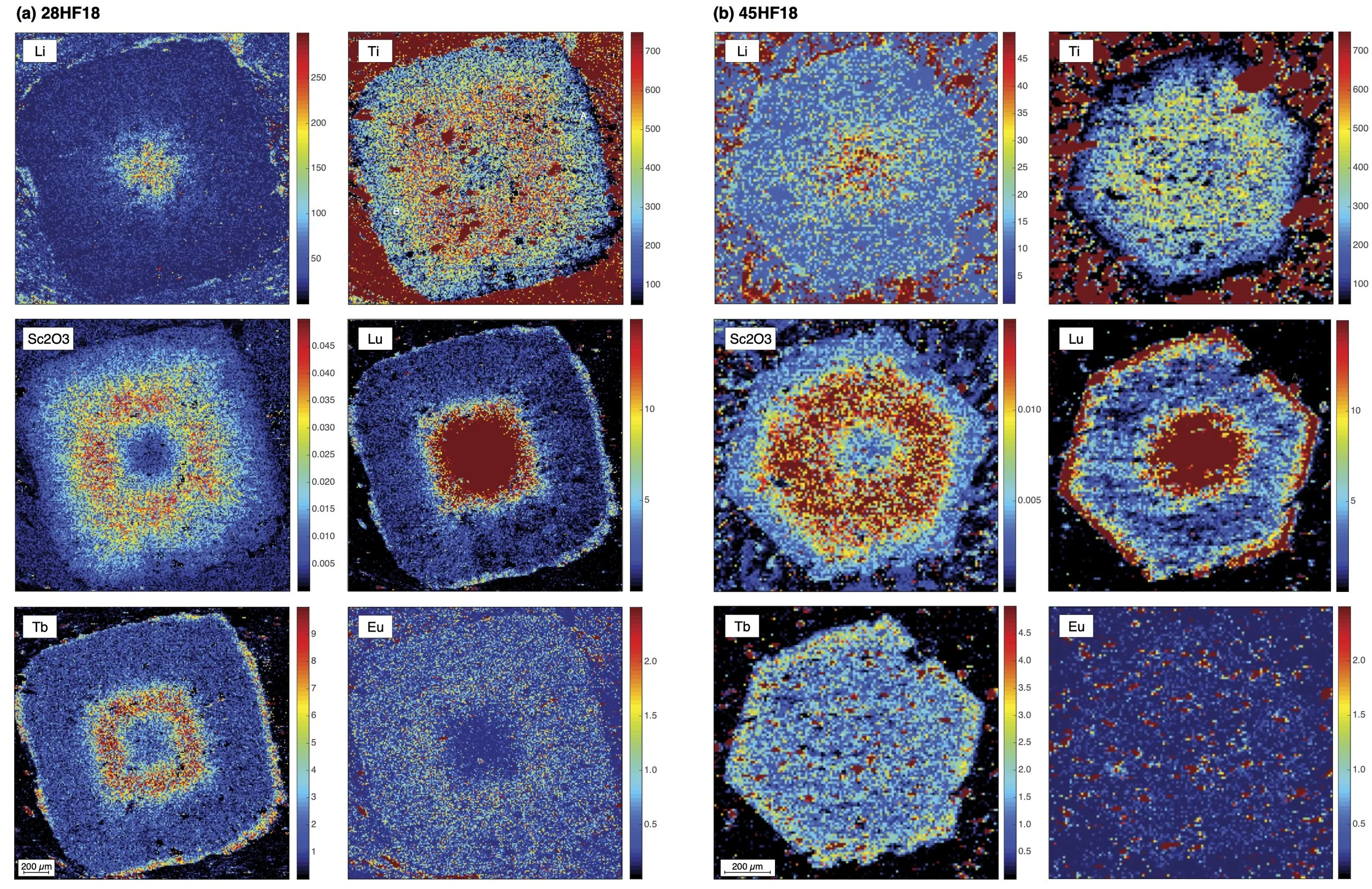
In solidarity with the LGBTQ+ community (always, not only in June!), here some #Pride2021🏳️🌈inspired (and 🍩 - shaped) trace element distribution maps of my favorite mineral.

Field work in arctic Norway
Just going through some old photos of field work in arctic Norway. Can’t wait to see this beauty again sometime..

Varangerbotn, Finnmark, Norway

Veidnesklubben, Finnmark, Norway

Veidnes, Finnmark, Norway

Kokelv, Finnmark, Norway
Cover image for Journal of Metamorphic Geology!

A figure from our recent paper in JMG has now been selected as the cover image for this journal! If you want to know how we interpreted the compositional pattern of garnet shown in the figure, read here (or get in touch if you have more questions)
Promotion to Full Professor
I’m excited to share that I got promoted to Full Professor today. Incredibly happy and thankful to have worked with so many talented students, ingenious co-workers, and supportive colleagues who all helped me along the way. Cheers!
The interfacial energy penalty to crystal growth close to equilibrium

The influence of interface properties on crystal growth may be larger than previously assumed. Does it change the way we interpret microstructures? New paper with @freyargeorge in Geology (in press, doi:10.1130/G48715.1)! Preprint here.
Modelling diffusion in garnet
Interested to model diffusion in garnet using a simple MATLAB script? The full multi-component case in 3D is available here. Please don’t judge: it’s the very first code I had written many years ago. But maybe it’s still useful for you?
diffuseo9.m is a MATLAB script designed to simulate multi-component diffusion (Mn, Fe, Mg, Ca) in garnet at a constant pressure, temperature, and fO2 assuming that the rim composition of garnet is fixed during the diffusion (open system). The kinetic data are those of Chakraborty and Ganguly (1992) with the option to modify fO2; by default, equilibration with graphite is assumed. Input is a compositional profile (core to rim), with the distance data (in cm) contained in vector Xnodecm, and the corresponding compositional data in the vectors Xmn, Xfe, and Xmg. Output from Theria_G (e.g., garnet_gen001.txt) can be used as input (and is included as example). However, other input can also be used if the script is adjusted.
Run the script and enter the required information into the Command Window (temperature, pressure, fO2, duration of diffusion). Also, when requested by the script, specify in the Command Window the spacing between isochrones to be plotted, as well as the size of the time step for the simulation. Ideally, the size of the time step should not exceed the number given. However, it is advisable to start the modelling with larger time steps to obtain first estimates quickly, and to decrease these time steps to the size given for final results.
This MATLAB script creates the files spss_profiles.mat, alm_profiles.mat, grs_profiles.mat, and py_profiles.mat which can be edited with text editors and spreadsheet software. These files contain the calculated compositional profiles after diffusion, with the first column containing the duration of diffusion (in years) and the first row containing the radius (in cm). The files will be replaced during each run of this script.
This model is part of Theria_G (Gaidies et al., 2008), so please refer to it if this script turns out to be useful for you. Happy modelling!
Update (June 2022):
Some people have expressed an interest to use this multi-component diffusion script in their teaching, so I updated it a little (diffuse_oMC.m). I also added a script to model the 1-component case (diffuse_o1C.m). Both scripts can be found here: diffuse_o.zip. The 1C model allows to quickly account for the influence of pre-exponential constant and activation energy, which may be useful when testing proposed Y,REE diffusion data. As always: feedback and questions are welcome.
Conditions, timing and rates of metamorphism of the Snowcap assemblage, west‐central Yukon

JMG Early Career Research Paper Prize to former team member Dr. Freya George
Congratulations to former team member Dr. Freya George for the Mike Brown Annual Early Career JMG Research Paper Prize for the publication: George, F.R. & Gaidies, F. 2020. Simultaneous operation of opposing reaction mechanisms: The influence of matrix heterogeneity on post‐kinematic garnet crystallization in an inverted metamorphic sequence.

According to the Journal of Metamorphic Geology, “The research presents a comprehensive set of observations, acquired through a state‐of‐the‐art multidisciplinary approach, on the 3D microstructural features, chemistry and compositional zoning of garnets in metapelites from an inverted Barrovian sequence in the Sikkim Himalaya. The excellent petrological characterization and careful observations, complemented by nice and self‐explaining figures, are set in the context of other minerals, bulk rock composition and texture. The results are used to model the process of garnet growth at an extreme level of detail, allowing the discussion of the potential tectonic significance of post‐kinematic porphyroblasts in strongly segregated matrices.”
Dr. George is currently a research fellow at Johns Hopkins University (Baltimore, USA).
Running Theria_G in batch mode
Running multiple Theria_G simulations in batch mode is a great way to save time when you want to systematically test how variations in input data (e.g., thermodynamic models of phases, chemical composition of system, P-T-t path, diffusion parameters, CSD of garnet, etc.) influence the simulation results. Your computer can run such a batch job for you!
An example of how to set this up using the Theria_G compilation provided here, is given below. Let me know if you have any questions!
Create a new folder for each case scenario you want to model. In the example given here, I wanted to test three different scenarios, and so I created the subfolders Scenario1, Scenario2, and Scenario3 (of course, you can use different names for these folders if you wish).
If you use a Windows PC, the paths for the subfolders would be:
C:\TheriakDominoWIN\GeochemSoc2020\Working\Scenario1C:\TheriakDominoWIN\GeochemSoc2020\Working\Scenario2C:\TheriakDominoWIN\GeochemSoc2020\Working\Scenario3The respective paths for MacOS would be:
/Users/fredsmacbookpro/TheriakDominoMAC/GeochemSoc2020/Working/Scenario1/Users/fredsmacbookpro/TheriakDominoMAC/GeochemSoc2020/Working/Scenario2/Users/fredsmacbookpro/TheriakDominoMAC/GeochemSoc2020/Working/Scenario3where “fredsmacbookpro” is your Home Directory.
Now make sure to put into each of these subfolders the Theria_G input files for each scenario: THERIN.txt, theriag_CSD.txt, theriag_DIF.txt, theriag_PTt.txt. Don’t forget to include the database file. In this example, I used ds5_5.txt in Scenario1 and JUN92bs.txt in Scenario2, but the other input files are identical. Scenario3 differs from Scenario1 and Scenario2 by the heating rate defined in theriag_PTt.txt, and it uses the database ds5_5.txt.
Using a simple text editor (e.g., Notepad, TextEdit), create the file input.txt and add a copy of it into each scenario subfolder. This file contains the name of the database you want to use in each modelling scenario. It is important that input.txt contains two lines, and that the second line is empty.
So, in this example, the content of input.txt in the Scenario1 folder is
ds5_5.txt
and input.txt in the Scenario2 folder looks like
JUN92bs.txt
input.txt in the Scenario3 folder is identical to input.txt in the Scenario1 folder.
Now create the batch file.
On a Windows PC, use Notepad and create a file with the following content:
cd C:\TheriakDominoWIN\GeochemSoc2020\Working\Scenario1theriag<input.txtcd C:\TheriakDominoWIN\GeochemSoc2020\Working\Scenario2theriag<input.txtcd C:\TheriakDominoWIN\GeochemSoc2020\Working\Scenario3theriag<input.txtMake sure that the last line in this file is empty. Save this file as theriag_job.bat and put it into the folder
C:\TheriakDominoWIN\GeochemSoc2020\WorkingWith MacOS, use TextEdit and create a file that contains the following lines:
cd /Users/fredsmacbookpro/TheriakDominoMAC/GeochemSoc2020/Working/Scenario1theriag<input.txtcd /Users/fredsmacbookpro/TheriakDominoMAC/GeochemSoc2020/Working/Scenario2theriag<input.txtcd /Users/fredsmacbookpro/TheriakDominoMAC/GeochemSoc2020/Working/Scenario3theriag<input.txtAgain, make sure to replace “fredsmacbookpro” with your Working Directory. Also note that the last line needs to be empty. Save the file as theriag_job and put it into the folder
/Users/fredsmacbookpro/TheriakDominoMAC/GeochemSoc2020/Workingwhere ”fredsmacbookpro” is your username.
Now, open Terminal, enter “dom” into the console window, and hit the return key. Then type
chmod a+x theriag_jobYou are now ready to run the Theria_G simulations in batch mode.
On a Windows PC, use File Explorer to go into the folder
C:\TheriakDominoWIN\GeochemSoc2020\Workingand double-click the ”start.bat” file. This will open a console window. Enter theriag_job and hit the return key.
Using MacOS, open Terminal, type ”dom” into the console window, and hit the return key. Now enter theriag_job and hit return again.
The Theria_G simulations will now run one after the other, with the output files generated in each scenario subfolder.
New Theria_G compilation
The latest Theria_G compilation (for Windows PC and MacOS) is online now. For download and installation instructions, please visit here. Happy modelling!